

How GA4, Google Tag Manager, and Dashboards Improve Marketing Decisions
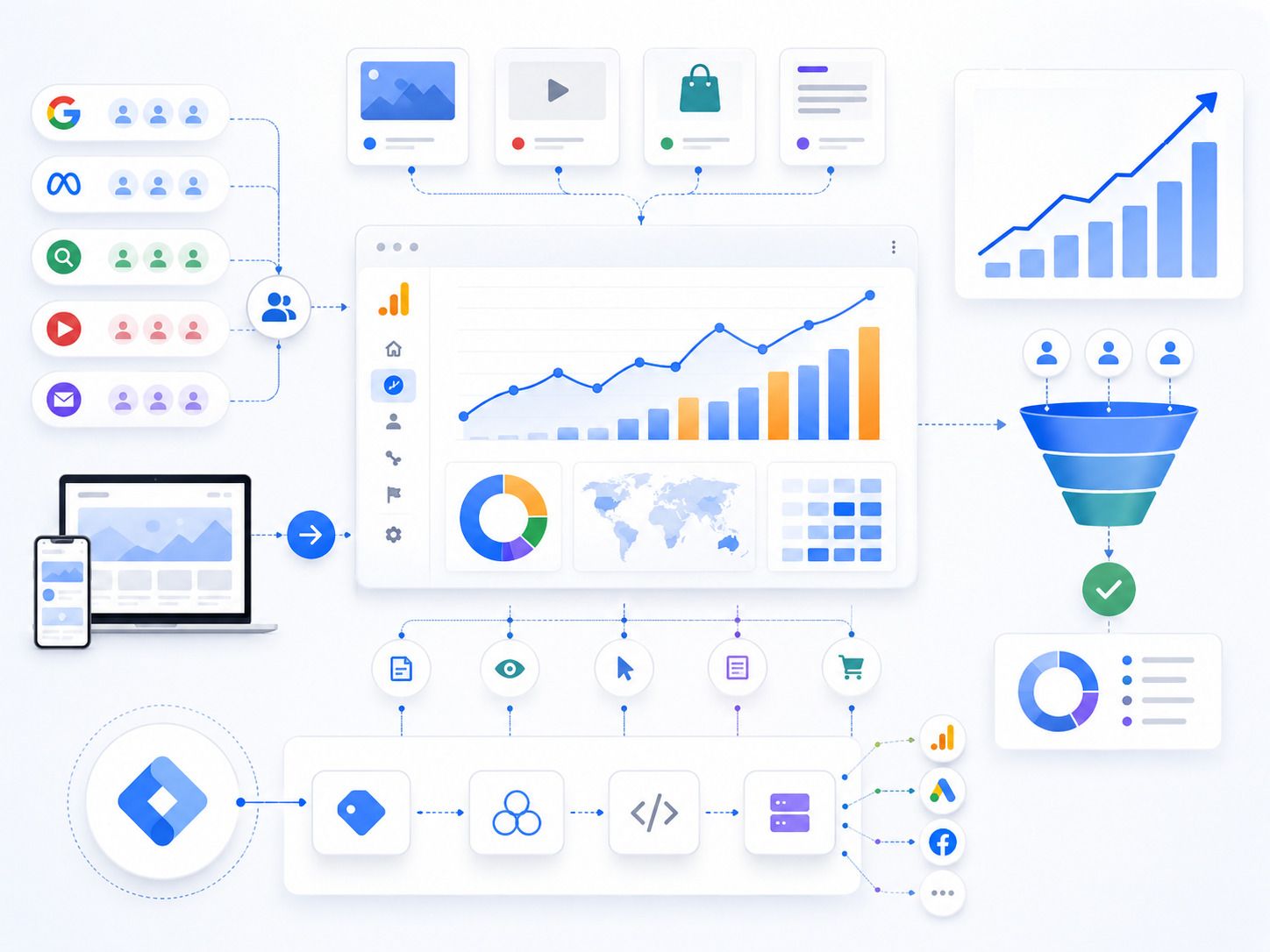
Marketing decisions become stronger when they are based on clear data. Without proper tracking, businesses may know how much they spend, but not what truly works.
A campaign may bring traffic, but not leads. A landing page may get visits, but not form fills. A social media ad may look active, but may not support sales. This is why analytics tools are important.
GA4, Google Tag Manager, and dashboards help businesses understand user behavior, campaign performance, conversion paths, and lead quality. Together, they turn scattered marketing data into useful insights.
What Is GA4?
GA4, or Google Analytics 4, is Google’s analytics platform for tracking website and app activity.
It helps businesses understand how users find a website, which pages they visit, what actions they take, and where they drop off.
Unlike older analytics models, GA4 focuses on events. This means businesses can track actions such as page views, button clicks, form submissions, video plays, file downloads, scrolls, purchases, and other meaningful interactions.
GA4 helps answer important questions:
• Where are users coming from?
• Which pages attract the most visitors?
• Which channels generate conversions?
• How do users move through the website?
• Where are users dropping off?
• Which campaigns support leads or sales?
These answers help businesses make better marketing decisions.
What Is Google Tag Manager?
Google Tag Manager, or GTM, is a tool that helps manage tracking tags without changing website code every time.
A tag is a small piece of tracking code used by tools like GA4, Google Ads, Meta Pixel, LinkedIn Insight Tag, and other platforms.
With GTM, businesses can add and manage tracking from one place. This makes tracking setup cleaner and more flexible.
For example, GTM can help track:
• Form submissions
• Button clicks
• Phone number clicks
• WhatsApp clicks
• PDF downloads
• Video engagement
• Scroll depth
• Lead form starts
• Checkout actions
• Thank-you page visits
This gives marketers better visibility into user actions that matter.
What Are Marketing Dashboards?
Marketing dashboards bring data from different platforms into one clear view.
Instead of checking GA4, Google Ads, Meta Ads, Search Console, CRM, and email tools separately, dashboards can show key metrics in one place.
A dashboard may include:
• Website traffic
• Lead sources
• Campaign performance
• Cost per lead
• Conversion rate
• SEO growth
• Paid ad spend
• Social media results
• Email performance
• Revenue data
Dashboards help teams review performance faster and make decisions with more confidence.
Why These Tools Matter for Marketing
Marketing without tracking can lead to poor decisions.
A business may continue spending on a campaign because it gets many clicks. But clicks do not always mean customers. Another campaign may have lower traffic but better leads.
GA4, GTM, and dashboards help businesses see beyond surface-level metrics.
They show what happens after the click.
A company using Digital Marketing Services in Denver can use these tools to track campaign performance, local lead sources, website actions, and conversion quality across different marketing channels.
GA4 Helps Understand User Behavior
GA4 shows how people interact with a website.
This includes where users come from, which pages they visit, how long they stay, and what actions they complete.
For example, if many users visit a service page but do not submit a form, the page may need stronger messaging, better CTA placement, more trust signals, or a shorter form.
If users leave quickly from a landing page, the issue may be poor page speed, weak headline, or mismatch between ad and page content.
GA4 helps identify these problems before more budget is wasted.
GTM Helps Track Important Actions
GA4 gives strong insights, but GTM helps capture more specific actions.
Many important actions do not always happen on thank-you pages. Users may click a phone number, tap WhatsApp, start a form, download a brochure, or click a pricing button.
GTM helps track these micro-conversions.
Micro-conversions are useful because they show interest before the final conversion.
For example:
• A pricing button click may show strong buying intent
• A form start may show interest but also reveal form friction
• A WhatsApp click may show mobile-first enquiry behavior
• A brochure download may show research-stage interest
Tracking these actions helps marketers understand the full journey.
Dashboards Make Reporting Easier
Marketing reports can become confusing when data is scattered.
Dashboards simplify reporting by showing important numbers in a visual and organized way.
A good dashboard should not include every available metric. It should focus on the numbers that support business decisions.
For example, a lead generation dashboard may show:
• Total leads
• Lead source
• Cost per lead
• Cost per qualified lead
• Landing page conversion rate
• Best-performing campaigns
• Website traffic by channel
• Form submissions
• Call clicks
• Sales-qualified leads
This helps business owners and marketing teams see what needs attention.
Better Attribution Across Channels
Customers rarely convert from one touchpoint.
They may see a Meta Ad, visit the website, return through Google Search, read a blog, and later submit an enquiry after clicking a retargeting ad.
GA4 and dashboards help show how different channels contribute to conversions.
This is important because the last click does not always tell the full story.
A blog may not generate the final form submission, but it may help build trust. A social media campaign may not close the lead, but it may introduce the brand. A retargeting ad may bring users back when they are ready.
Better attribution helps businesses invest smarter.

Campaign Optimization Becomes Faster
When tracking is clear, campaign improvements become faster.
Marketers can see which keywords, ads, audiences, landing pages, and traffic sources bring better results.
For paid ads, this helps adjust budgets, pause weak campaigns, improve creatives, and refine targeting.
For SEO, this helps identify which pages bring organic traffic and which keywords need stronger content.
For landing pages, this helps improve conversion rate by studying user actions.
Clear data helps teams act faster instead of guessing.
Tracking Lead Quality, Not Just Lead Volume
Lead count alone can be misleading.
A campaign may generate many leads, but if those leads do not answer calls or match your target audience, the campaign may not be profitable.
GA4, GTM, CRM data, and dashboards can help connect lead sources with lead quality.
Businesses should track:
• Which campaigns bring qualified leads
• Which landing pages bring serious enquiries
• Which sources lead to sales calls
• Which channels generate low-quality contacts
• Which locations or audiences perform better
This helps marketing teams focus on quality, not just quantity.
Improving Landing Page Performance
Landing pages need constant improvement.
GA4 and GTM can show how users behave on landing pages. Dashboards can show which pages convert best.
Useful landing page data includes:
• Page visits
• Conversion rate
• Button clicks
• Form starts
• Form completions
• Scroll depth
• Mobile performance
• Traffic source
• Exit rate
If many users start the form but do not submit it, the form may be too long. If users do not scroll, the hero section may not be strong enough. If mobile users drop off, the mobile layout may need improvement.
This data helps improve results without increasing ad spend.
Better Budget Allocation
Marketing budgets should move toward what performs.
Analytics tools help businesses understand where money creates value and where it gets wasted.
For example, if Google Ads brings fewer leads but better quality, it may deserve more budget. If Meta Ads brings cheaper leads but poor qualification, the campaign may need better targeting or form filters.
Dashboards help compare channels more clearly.
Better budget allocation improves ROI over time.
Team Alignment Improves
GA4, GTM, and dashboards also improve communication between teams.
Marketing teams can show campaign performance. Sales teams can give feedback on lead quality. Business owners can review outcomes without going through complex reports.
When everyone sees the same data, discussions become more practical.
Instead of asking “Are ads working?” teams can ask:
• Which campaign brought qualified leads?
• Which page has the highest conversion rate?
• Which source brings better sales conversations?
• Which campaign needs budget reduction?
• Which content supports enquiries?
This improves decision-making across the business.
Common Tracking Mistakes to Avoid
Many businesses use analytics tools but still miss important data.
Common mistakes include:
• Not setting up conversion events
• Tracking only page views
• Not using GTM properly
• Missing phone and WhatsApp click tracking
• Not linking GA4 with ad platforms
• Using dashboards with too many metrics
• Not filtering internal traffic
• Not checking tracking errors
• Tracking leads but not lead quality
• Not reviewing reports regularly
Good tracking needs setup, testing, and regular maintenance.
Final Thoughts
GA4, Google Tag Manager, and dashboards help businesses make better marketing decisions by showing what users do, which channels perform, and where campaigns need improvement.
GA4 explains user behavior. Google Tag Manager tracks important actions. Dashboards bring the data together in a simple format.
When these tools work together, businesses can reduce guesswork, improve campaigns, track lead quality, optimize landing pages, and spend marketing budgets more wisely.
Strong analytics does not only report performance. It helps businesses understand what to improve next.
"“Better marketing decisions start when businesses can see what users do, where leads come from, and which campaigns create real value.”"